
Shure SLXD4-DAN+ Wireless Microphone Receiver
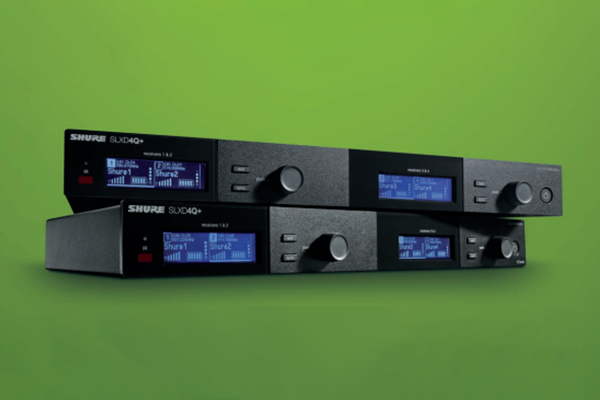
Shure has released its latest microphone innovation, the Dante-enabled SLXD4-DAN+. Myke Ireland checks it out to see how it stacks up.
For the longest part of my career, I’ve always looked forward to the opportunities where I can substitute the word “mic”, for “Myke”. Today, lucky reader is where you finally get to experience the awe of this yourself. Kindly allow me to welcome you all to the official review of the new SLXD4-DAN+ wireless microphone receiver from Shure, or as I’ll be calling it – The Myke Drop.
ADVERTISEMENT
Shure is a name as synonymous with microphones as blender-oven-stove-pot-chiller devices are with Thermomix, so when you’re gifted the chance to review a Shure system, you’re also gifted the pleasure of having a million different ways to say: It’s really great. Shure isn’t the kind of brand that has to prove itself anymore, they’re kind of like Apple in the sense the industry watches what they do to better understand where the market is going.
So of course, in an ecosystem that’s constantly bombarded with “me too” manufacturers and cheap imported knock-offs, Shure’s biggest challenge remains ensuring their value transaction is strong enough to keep the circling sharks at bay. As the old saying goes: “The only thing harder than getting the number one spot, is keeping it.”
So, let’s check in and see how they’re doing.
First impressions
Out of the box the single RU mountable receiver is solid, metal where it’s needed, plastic where it’s suited. On the underside of the chassis are four stamped protrusions that can double as feet if you’re not of the rack mounting ilk, you can use the supplied rubber grip stops to stop it from sliding around. The reality is we’re all grown-ups here, and we know very well that SLX-D+ belongs in a rack, so get it in one.
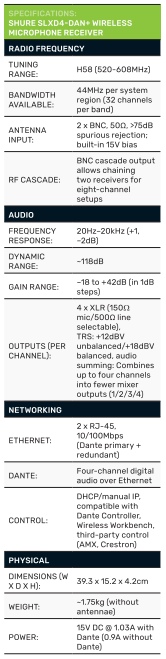
Yes, it comes with all the equipment you need to mount it securely: a couple of rack ears, ready to go, plus all extras; Quarter-wave antennas, power supply and an additional pair of BNC-to-BNC connectors. What for, you ask? For the built-in antenna cascade function the SLX-D+ is designed with. Because the only thing that looks worse that 38 antennas sticking out of your rack, is 38 BNC cables connected to four antenna combiners that are connected to another antenna combiner. My math’s is likely off a bit, but you get my drift.
Front of the box? Sleek. Modern. No fancy protruding logos, no weird cutouts or vents for dust/tomato sauce to sneak in. Just a solid, clean front panel. Two press buttons and a rotary encoder per channel pair. The rotary encoder is your main navigation device with a click press for confirmation.
The rack itself is split in two, and anyone who’s used the two-channel unit in the past will recognise what’s going on here. It’s called design efficiency; design modular stability and copy paste as the demands get bigger. Translates very simply to: more channels, better scaling.
Turning the unit around – on the back panel, we’ve got four balanced XLR microphone outputs for the four available channels, replicated across quarter inch outs, the antenna connectors and the cascade connectors. Finally, two Ethernet ports, and we all know what it means when you have two network ports on a bit of gear these days. Dante and redundant Dante, completing the whole digitally connected experience for this SLX-D+ bad boy.
Power-up and system setup
Powering the unit on, you’re greeted with two very bright, very sharp LED displays, one for channels one and two, the other for three and four. Brightness can be turned down and probably should be if you’re back of house, if your front of house, you can eyeball these readouts from a good three or four meters away.
Now, I’m never the guy to work through built-in setup functions in real life, I’m far too attached to the ancient ways, but I figured I’d give it a go this time. And honestly? I’m glad I did. Hands down the easiest wireless microphone setup I’ve ever used.
‘Guided Setup’ is how its defined in the menu, which I’m sure should just say “idiot proof”. First step: ‘Initialize System Bank’, confirm that, and the unit resets all your settings to zero. Super handy if you’re in rental or managing high-turnover environments.
From there, the system asks you to confirm a group scan to find available frequencies. It tells you the best back of channels to use and how many channels you have to work with inside that bank, you confirm the scan, it auto-assigns frequencies to the four receiver channels. From here it’s as simple as pressing the ‘Sync’ button on the front of the unit. Turn on your handheld or belt pack transmitter, point it at the IR port, and the designated frequency is transferred instantly. Bang.
Hand on my heart, from power up to having four mics assigned and operating, 30 seconds. Tops.
That’s a huge win for integrators, production techs and rental teams, especially in environments like the Melbourne CBD where frequencies change more often than the weather. Being able to reconfigure from the front of the unit, quickly and without network access is a massive value add and a comforting insurance policy.
So, yeah. Big tick on that one.
Getting it into the stable
While the front panel gives you just enough to get by in a pinch, the real power of the SLXD4Q-DAN+ comes alive when you drive it from software, and frankly, that’s the way modern RF management should be done. Shure’s Wireless Workbench (WWB6) provides full remote access to frequency coordination, gain staging, device naming and live monitoring, all from your desktop. You can scan, assign and visualise RF activity across multiple channels with far more precision than any front panel ever could. Pair that with ShurePlus Channels on iOS, and you’ve got mobile control in live environments: monitor RF, battery and audio levels on the go, or make fast adjustments without crawling into a rack.
Handheld transmitter impressions
This is where the SLX really starts to shine — and where you start to feel like a rock star.
While the range fits neatly into corporate, education and government environments, it’s really intended to do its best work on the stage. The handheld transmitter is impressively balanced, in my case I was using the dedicated Shure battery pack (best option for most accurate battery stats). The weight lands exactly where your grip naturally falls, making it comfortable to hold, even with two hands and even if you’re going full death metal growl, there’s plenty of grip without interfering with the polar pattern.
Controls are smartly recessed to avoid accidental presses. The LED display is small but once again sharp, bright, clear and informative when you need a quick check mid-performance.
Charging for the handled is via the connector at the base, compatible with Shure’s drop-in cradles. I didn’t receive the belt pack or boundary mic variants for review, but based on this handheld, the pedigree clearly carries across the SLX-D+ range.
The wrap
So, is Shure still worthy of holding the number one spot?
On performance, build quality, setup speed, and system flexibility, I’d say absolutely. SLX-D+ maintain Shure’s reputation at the same time it reimagines it. This isn’t a system that’s trying to win the bottom of the market. It’s a clear declaration that Shure still owns the top.
Now, let’s talk numbers.
The SLXD4Q-DAN+ currently retails in Australia at around $9,500 for the receiver alone. That breaks down to about $2,375 per RF channel and once you add a handheld or bodypack transmitter (roughly $1,000 per channel, depending on configuration), you’re sitting at around $3,375 per channel all-in.
No, it’s not cheap. But it’s not meant to be.
SLX-D+ is where Shure stops professing and starts proving. It’s the point where they shed the professional attire, loosen the tie and go full performance mode. If you’re running events, managing venues, or just sick of fighting with underpowered wireless kits, this is where the upgrade begins.
Manufacturer: Shure
Distributed by: Jands
-
ADVERTISEMENT
-
ADVERTISEMENT
-
ADVERTISEMENT
-
ADVERTISEMENT