
How do devices ‘chat’? An overview of common data exchange formats

Integrators can make a number of devices speak to one another, but how does it actually work? Geoff Meads explains.
The world has been awash in recent years with talk of big data. Simply put, there are a lot of companies (and governments, for that matter) collecting information about a lot of people. If the data is anonymised, then this can be very powerful in understanding behaviours and delivering better, more efficient services. However, as you might imagine, it could also be used for harm in the wrong hands.
ADVERTISEMENT
The consumption of data is the topic for this column. For an increasing number of services, we exchange data between offices, a customer’s property and the cloud. This all begs the question: How is the data exchanged?
The answer is, as ever, a bit of a minefield! With that in mind, I’ve summarised here some of the more common methods and protocols.
eXtensible Markup Language (XML)
XML is a method of structuring specific data points in a way that allows them to be identified within larger files. There are several variants of XML, the most used version being HTML, which forms the basis of all web pages and, often as not, graphical user interfaces within control systems.
XML ‘tags’ are used to identify elements of certain types where the data’s value sits between a pair of opening and closing tags. As an example, paragraph text starts with a <p> tag and ends with a </p> tag. So, a short paragraph might look like this in code:
<p>Mary had a little lamb. Its fleece was white as snow. </p>
By enclosing all paragraphs with a <p> tag, they can be styled to a common set of rules. Settings like font, colour, text size and line height can be applied to all occurrences of paragraph text with a single instruction. This not only makes setting these elements quicker, but also ensures universal styling across pages.
Some tags might contain other tags. For example, all page content together would be wrapped with a <body> tag. A simple page with two paragraphs might look something like this:
<body>
<p>Paragraph one.</p>
<p>Paragraph two.</p>
</body>
Although certain systems used fixed tags (like the <p> example above), XML supports the use of tags using any name. The only stipulation being that start and end tags must use the same label, for example:
<temperature>30</temperature>
JavaScript Object Notation (JSON)
JSON operates to enclose data in formal structures called ‘objects’, making them readable by a wide array of services. By agreeing on a presentation format and subsequent layout of the ‘object’, standards can be set for certain object types.
JSON data appears like a series of recursive arrays. Each array can contain any number of field/value pairs and some values can, themselves, be arrays. For example, an object type of ‘loudspeaker’ might contain some values that are text, some that are numeric values and some that are arrays. In the following example, the ‘dimensions’ field contains a value that is an array of the height, length and depth:
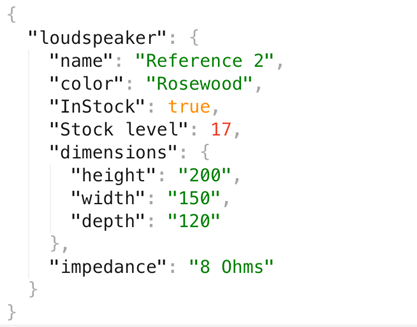
You’ll notice that this JSON object contains different types of data. The ‘name’, ‘colour’ and ‘impedance’ values are surrounded by quotation marks, meaning the value expected is text. Numerical values (like that for stock level) are plain integer numbers and the Instock field contains a Boolean (true or false).
A great example of JSON in use is in the schema data formats used online to describe all sorts of entities, such as companies, articles, products and even music acts. You can take a deep dive into these highly useful data exchange standards at schema.org.
File Transfer Protocol (FTP)
FTP has been around for many years and is a standardised way of moving complete files of information between two computers. There is also a more secure version called Secure File Transfer Protocol (SFTP). Although it can be automated, FTP is often a manual process.
The initial ingredients for such a transfer consist of a destination computer running an FTP server program and a source computer running an FTP client program. A human, usually at the client end, opens the FTP client, connects to the remote server using a destination address and login credentials. Once connected, they use an interface of either command-line instructions or graphical elements to push and pull files between the two machines. At the end of the process, the user logs out.
FTP is often used for large file transfers and by programmers updating remote devices such as web or application servers. It’s also often used for moving executable files to a destination computer so they can be run locally on the remote machine.
Application programming interfaces (APIs)
Where XML and JSON are ways of formatting data, an API is more like FTP in that it is a mechanism for exchanging data, often in JSON or XML format. An API acts as a ‘service’ that exists on a remote computer. Other computers can access the service using an agreed protocol, plus login credentials and/or API “keys” for added security.
A good example of this is the mapping API offered by Google. Once an account has been created for the service and a key obtained, the client device, using the remote API, can send requests to the API by first logging in with its key and then sending specific requests for data. If you have ever seen Google Maps embedded on a control system panel or website, then this is the API that is in use. It can also be configured to look up place details, directions or distances.
There is also a wide range of weather APIs to call on for local weather information, such as openweathermap.org.
Conclusion
The above detail scrapes just the surface of data exchange possibilities and formats by illustrating some common examples. The fact that there are so many formats for exchanging data shows just how easily things can go wrong and why we have so many compatibility issues. However, the good news is that, at least in this author’s view, the number of formats in wide usage is reducing.
With a little knowledge in the ability to recognise the differences, we can be in a position to choose devices or services that are more likely to work together. If not, we know we are in for some serious programming to make it all work.
-
ADVERTISEMENT
-
ADVERTISEMENT
-
ADVERTISEMENT
-
ADVERTISEMENT