
Sonos Era 100 Pro
A commercial staple, Sonos has released its latest audio solution for the integrator and custom installation channel. Stephen Dawson looks at how they stack up.
It seems that every second decent café has a pair of small Sonos speakers installed. Usually, they are various versions of the Sonos One, and some are the even older Sonos Play:1 speakers from 2013. The reason is obvious: decent sound, reasonable price, easy installation and easy to use, especially with a streaming service such as Spotify.
ADVERTISEMENT
These days the equivalent model is the Sonos Era 100, but now a new variant, the Sonos Era 100 Pro speakers up the ease of installation… while counterintuitively requiring professional installation.
What it is
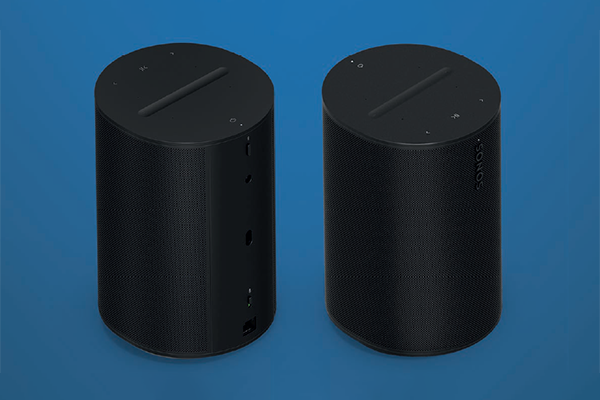
To be clear, the Sonos Era 100 Pro speakers are very similar to their consumer siblings. You probably couldn’t tell them apart at glance. But there are significant differences.
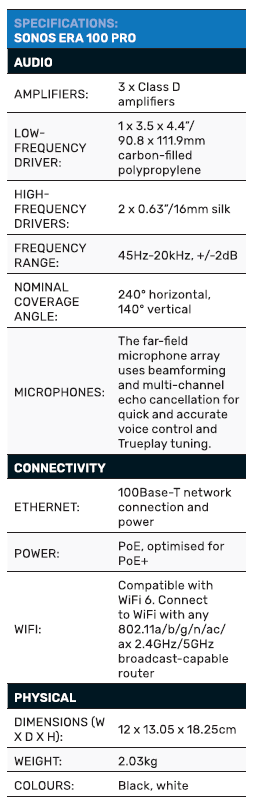
The headline difference is rather than being mains powered (the standard speakers have a figure eight power input), the Pros are powered by means of an Ethernet PoE+ connection. The consumer models don’t have an Ethernet port at all, relying entirely on WiFi. The Pro also supports WiFi for feeding signals, but it seems hardly worth the bother. Indeed, in a commercial environment, sticking with wired network connections can avoid congestion.
So, what’s PoE+? It’s an update on the original Power over Ethernet (PoE) standard. The original provided a little over 15W per connected device while PoE+ requires 30W.
Which, it turns out, is the amount upon which the Sonos Ero 100 Pro speakers are designed to operate.
Other differences from the consumer version include:
- A three-year, rather than one-year, warranty
- Compatibility with a specialised “Surface mount” mounting attachment that allows quite flexible swivelling
- An attachment point for a safety cable, should local regulations require it in commercial environments
- Available only to installers
And the commonalities?
The Era 100 speakers are compact kind-of cylindrical units, standing 183mm tall and maxing out at 131mm in depth. Inside each are three Class-D amps, one for each of the three drivers. Two are 16mm silk dome high frequency drivers. They are situated near the top of the enclosure, pointing to the sides at around 45°. Between and below them is a 91mm by 112mm oval bass driver.
Inside are additional electronics for WiFi, Ethernet and Bluetooth connectivity. And USB-C. Apparently there’s a dongle for the rear USB connection which allows analogue audio to be fed to the speakers.
And, of course, the Sonos Era 100 Pro speakers are fully compatible with the current version of the Sonos app, so can be fully integrated with an existing Sonos system if required. I have a Sonos Arc and Sonos Five speaker in my home, connected and frequently producing sound, and during my playing with the Sonos app, I found that I could treat the Era 100 Pro speakers as just part of the family.
In (likely) addition, there’s a Sonos Pro app and subscription service; presently (it seems) only available in the United States. This includes installer-friendly remote control and licensing for music streaming to public venues (US$70 for the highest level), and may prove useful in the future. For the moment, I suspect that many of the aforementioned cafés just use a regular premium Spotify subscription to provide background music for their patrons and will continue to do so. Of course, Spotify is only one of several music streaming services which work with a Sonos system.
Like the regular Sonos Era 100 speakers, these ones also support voice operation. They use either Amazon Alexa or Sonos’ own system. As a Google Assistant user, neither suited me. There are four small microphones in the top, and these can by physically disabled with a small, hardwired switch on the rear. I expect that in retail environments these would be off, but having the voice capability could be useful in home installations.
Also on the back is a small button to start Bluetooth pairing. The other controls are via the Sonos app, or the touch controls on the top of the unit. These are play/pause, forwards and backwards track skip, volume up and down, and a button to invoke the voice function.
The Era 100 Pro speakers come in pairs and are supplied with a small bolt that works with the mounting point on their undersides.
Setup
To be clear: there is only way to power these speakers. And that’s using PoE, preferably PoE+ for the higher power availability. Since my home and office network doesn’t support PoE, I used a couple of PoE+ compatible injectors. That is, I used network cables from my regular office network switch to connect to the injectors, and then network cables from their outputs to the Sonos speakers.
In a full home, or perhaps a shop, installation, you’d typically use a PoE+ network switch with enough outputs to support as many Sonos Era 100 Pro speakers as you wanted… remembering that they fully support multiple zones or can be grouped into any combination that suits a particular installation.
I’ve been installing network speakers for testing for a couple of decades, and it has often involved a lot of problem solving and finger crossing. But for the past ten years of so, Sonos gear had been, for me, utterly trouble free. And so, it was with this system.
I plugged both speakers into the network via the PoE injectors. They flashed their modest LEDs for a little while as they booted up. When that had settled down, I fired up the Sonos app on my Android phone. It immediately identified one of the speakers and invited me to install it. I followed the instructions, gave it a name, and waited for a short time as the firmware was upgraded to the latest version. The minute-indicator on my watch was still showing the same digit when the upgrade finished as it had when the process started.
It was clear which speaker was being set up, because a tone was sounded from it. But what about the other speaker? It wasn’t offered up by the app so forthrightly, but a few seconds in the app led to the “Add Device” button. A tap on that and a repeat of the previous process added the left speaker.
It was as easy as these things can possibly be.
Hey, two speakers, one room! I decided to set them up as a stereo pair. A little exploration in the app found the way to do this. There was a pause for several minutes since the app decided that something had to be upgraded to support a stereo L/R connection. I wasn’t sure what. The app itself? Unlikely. I suspected it was to do with the existing Sonos speakers in my system.
Anyway, once that was done, linking the Era 100 Pro speakers for stereo operation was simple. The process also made sure that left and right were properly allocated.
At the end of the installation, the app offers the ability for room tuning. There are two levels. The first uses the speakers’ built-in microphones and is available for both Android and iOS devices, while the second is available only for iOS devices, using the device’s microphone. (Apple is easier to model for this kind of exercise, because there is a manageable number of devices with specific microphone characteristics.) Using the universal tuning system, a series of not unpleasant sounds were played for, perhaps, twenty seconds, and then it was done. The advanced tuning with Apple devices takes a bit longer because you have to walk around the room with your phone and tablet so that the system can assess the sound in a broad area. Still, it’s straightforward.
In use
In short, the Sonos Era 100 Pro speakers sound ridiculously good; way better than they ought to. And way better than your typical network or Bluetooth speakers of similar size.
Sonos claims a frequency response of 45 to 20,000Hz, +/-3dB. I’d hesitate to dispute that. What I heard was a solid, well-balanced sound. In particular, the bass was astonishingly strong from such compact devices. For example, I’ve just started playing Cake’s hit album Fashion Nugget, and the drum kit pounded out instantly in a roundness and depth that belied the size of these speakers. And the bass guitar? Absolutely solid.
I had them sitting atop my Dynaudio Contour 20i speakers (around $9.5K a pair), and few regular people would suspect that the sound was coming from the Sonos speakers.
Which isn’t to say that they produce anything like the audiophile performance of the Dynaudios. If anything, the mid to upper bass is a touch too prominent – a definite favourite of most listeners – and fine detail, impressive stereo depth and such are absent. But present is that balanced sound, a wide stereo presentation and a great deal of enjoyable listening.
I ran the Sonos Era 100 Pro speakers with great success using the Sonos app, using Spotify Connect, using TIDAL Connect and using Apple AirPlay. Sending music DLNA-style from both Android and iOS devices was with mixed success. With DLNA, the apps offered two options for the Sonos speakers (which, remember, were stereo linked). One didn’t work while the other worked properly, but only for one of the speakers with my iOS app. With my Android app, it worked fine in stereo mode.
In my decent-sized office, the clean volume levels were extremely impressive. In most home multi-room installations, and in the aforementioned cafés, they will have plenty of capacity to provide whatever is needed, short of headbanger levels.
Bluetooth worked as well as Bluetooth does. I’m not sure of the use case for it with these models. It does not support the stereo functionality, nor zones and such. Also, you can’t just supply power by the Ethernet port and then use a speaker only for Bluetooth. It isn’t available until you have properly installed the speaker via the Sonos app.
Conclusion
One side of me is filled with undiluted admiration for the way these speakers easily excel in an important niche in the market. They work easily, sound solid, provide all the performance required in the places in which they’d be used, and are supported by reputable company. The other side of me has a niggle of doubt. The non-pro version is less than 60% of the price, likely provides similar audio performance, and probably works well in similar applications. Instead of a one-cable Ethernet PoE+ installation, they require a one-cable power installation. Still just one cable. Audio streaming over WiFi doesn’t need that much bandwidth, after all.
And my Sonos speakers have been running for around six years without a hiccough. I expect that the extra two years of warranty would be moot.
But I’m bit of a cheapskate. I can see the Sonos Era 100 Pro speakers fitting very well into an installer’s portfolio of offerings.
Manufacturer: Sonos
Distributed by: Westan
-
ADVERTISEMENT
-
ADVERTISEMENT
-
ADVERTISEMENT
-
ADVERTISEMENT