
Epson EH-QL3000B
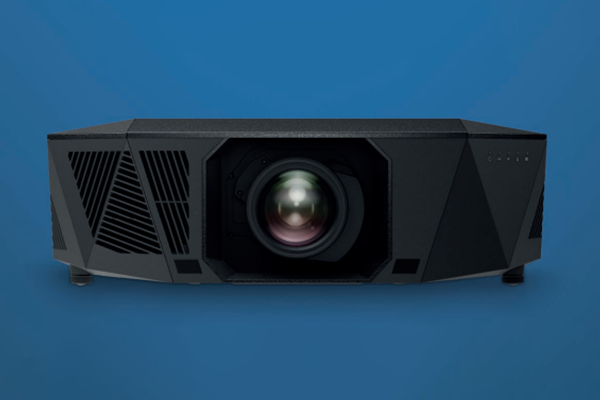
Epson, one of the biggest names in projection technology, has launched its latest solution. Myke Ireland unpacks the unit to see how it compares to its competitors.
There’s a certain kind of excitement when a box shows up at the door. Anyone who reviews gear knows it. You get the buzz of something new you didn’t have to pay for, something you get to unbox, live with for a little while and then send back.
ADVERTISEMENT
And in terms of my experiences with projector reviews, 90% of the time, the unit in question arrives in a box not much bigger than a pair of Jordans.
You can imagine my face when the Epson EH-QL3000B turned up. I’m peering out the window, expecting a van, maybe a courier with a barcode scanner. Instead? There’s a truck in the street. A proper truck with a hydraulic lift gate. And out of the back rolls this enormous box on a trolley, headed down my driveway. My first thought? They’ve delivered me a fridge by mistake.
So, while I’m staring at the box with my jaw on the floor, the driver nods at me and says: “Oh, there’s one more.” He disappears, then reappears with a full-sized Pelican case. And that’s the moment it clicks: This isn’t a cute home-theatre projector, this is something else entirely. That case is holding a lens, an interchangeable lens, which tells me all I need to know.
I work in commercial AV. I know what boxes like this mean. This thing clearly shares DNA with Epson’s commercial range. And in that world, there’s really only one rule: Image = big and bright. Which is why I’m already getting excited, because the spec sheet reads like a dream: 4K, 120Hz, full 4:4:4 chroma, HDR and a laser light engine driving six thousand lumens. These are the kinds of projectors I normally install in lecture theatres or corporate hubs. Only this time, it’s sitting in my living room.
It arrived at 11am, and I figured I’d have to wait until dark to really put it through its paces. Well… how wrong I was.
Out of the box
First things first: when we talk about this as a 4K projector, what we’re really talking about is Epson’s 4K Enhancement (4KE) technology. Industry folks will know the drill; it’s still built on a 1080p 3LCD chip, with Epson’s pixel-shifting wizardry doing the heavy lifting to deliver a 3840 × 2160 image.
So yes, it’s pixel-shift rather than native 4K, but the engine is perfectly happy chewing through native 4K input without a hiccup. That’s the foundation.
Physically, the EH-QL3000B is a very good-looking projector. You can tell it’s been designed with the possibility of sitting on display in a home environment. The geometric lines and angular accents give it a modern edge, but you can still see the commercial DNA it inherits from Epson’s PU-series cousins, right down to the lens options and the underlying chassis design. If you’ve worked with the PU line in pro installs, you’ll feel right at home here.
Around the back, the connections are everything you’d expect: Two HDMI ports, RS-232 for control, a network port, multiple USBs for storage and playback, as well as a dedicated audio out for routing into a home theatre system. On the integration side, Epson has made sure it plays nicely in the consumer world with support for Crestron Connected and Control4, so tying it into an existing system is straightforward.
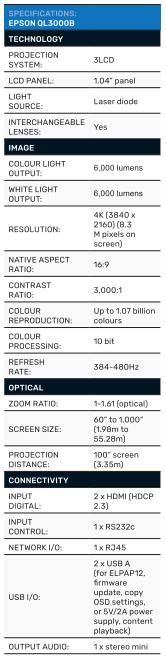
One of the biggest strengths here is flexibility. With an interchangeable lens system, you can position this projector pretty much anywhere, long-throw, short-throw, high, low, even mounted with a periscope/snorkel if your room layout demands it.
Access to Epson’s full commercial lens catalogue means you’ve got options that other “home” projectors simply don’t offer. But do keep in mind, lenses are expensive and some lenses can run you another five figures on top of your projector, so it’s important to do the math before you get your wallet out.
As far as where you end up putting it, this is a big box. Whether you want it on permanent display or tucked into a lifter that hides it away, it’s going to want to breathe, so you’ll need to plan for that footprint. And like its commercial cousins, it’s heavy. This isn’t a one-person job. Installation will take at least two sets of hands, and realistically, you should be budgeting for a professional install.
Same goes for calibration: Sure, it’ll look good straight out of the box, but if you want it dialled perfectly for your space, a professional calibration is the only way to unlock its full potential.
Performance
Fire this projector up and you quickly understand the price tag. Brightness is where it makes its case. I’d assumed I’d need to wait until after dark to do any testing, but I had it running at three in the afternoon in a well-lit room. And in all honesty, the image held its own against my LED display in terms of brightness. That’s where Epson’s image enhancement comes together, a wider aperture pushing more light, it’s physics.
HDR & 4K processing
HDR is where most projectors stumble. You normally lose brightness when chasing the extra dynamic range HDR demands. Not here. 4K HDR content stayed crisp, bright and sharp, with colours that looked spot-on, even projected onto a slightly off-white wall, with no calibration.
Built-in image processing modes handle most content cleanly. I did see some stutter with very high-motion sources like horse racing or Formula 1, but nothing that dents the day-to-day viewing experience. Important to highlight here, as with most devices that live in the realm of 4K, there are some conditions: If you want absolute max fidelity, you’re looking at 4K/60 with full 4:4:4 and HDR, but if you’re chasing that buttery-smooth 120Hz, you’ve got to step down to 4:2:2, and honestly, you’ll never notice unless you’re staring at Excel on a 300” wall.
Gaming & motion
The EH-QL3000B claims 4K at 120 Hz with sub-20ms latency, and gaming on a PS5 showed why that matters. The sheer image size is jaw-dropping, and responsiveness is solid.
I noticed some edge blur when racing through fast landscapes, but nothing that took away from the experience. The reality is that unless someone tells you it’s pixel-shifted 4K, you wouldn’t know, the human eye simply can’t pick it. A lot of that comes down to Epson’s QZ-X picture processor, which pulls weight in delivering smooth, fast frames without introducing lag.
Flexibility with lens shift
One underrated advantage of a projector like this is the scope of lens shift and zoom. Beyond installation flexibility, it gives you control over aspect ratios. Switch between 16:9, 21:9 or wider cinematic ratios and you can reposition the image to maximise screen real estate without compromising geometry.
It’s a level of adjustment you just don’t get on smaller home-theatre boxes, and it adds to the sense that this unit is built with commercial DNA.
User experience & final words
If you’ve never set up a projector with a commercial remote before, don’t let this be your first time; it’s got something like 50 buttons. Though the QL will happily run straight out of the box, if you want it to truly sing, calibration is essential. Dialling in colour, brightness and cinematic or gaming modes for your specific room is the only way to unlock its full potential. Out of the box, it’s good; calibrated, it’s stunning.
And while the remote is functional, it’s not something you’ll want to live with day-to-day. The best move is to get this thing under your control platform immediately. Whether that’s Control4, Crestron or even Home Assistant, a custom interface will save you frustration and make the whole experience seamless.
To be blunt, this projector isn’t for everyone. Particularly given its AUD retail price is set at $24,000 (plus lens) and more Aussie homes are likely to fit inside the EH-QL3000B than there are homes it could fit inside. It’s big, it’s expensive and it demands the right space and setup. But if you’ve got the room and the budget, and if what you want is wow every time you hit play, then this is where it’s at.
Forget the spec-sheet debates about ‘true 4K’. In the real world, you’re not losing anything. What you gain instead is the freedom to run your cinema all day, every day, without worrying about blackout curtains or dimming the lights. Your mates can argue about pixels while they wait until nightfall to fire up their systems. You’ll already be halfway through a double feature.
Manufacturer: Epson
Distributed by: Epson
-
ADVERTISEMENT
-
ADVERTISEMENT
-
ADVERTISEMENT
-
ADVERTISEMENT