
Barco ClickShare Hub Pro and Control Panel
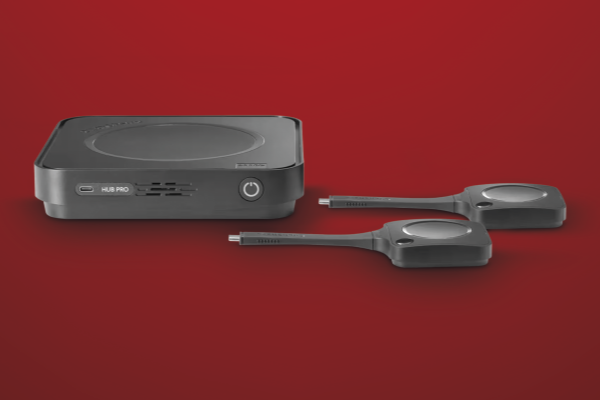
One of the biggest names in collaboration technology, Barco, has released the ClickShare Hub. Myke Ireland checks it out to see how it compares.
For a long time, I’ve been sceptical of late arrivals to the Microsoft Teams Room space.
ADVERTISEMENT
More often than not, it feels like a manufacturer has either run out of runway in their core category or lost the ability to meaningfully innovate, so they pivot sideways into Teams Rooms in the hope of capturing some of the market by association. And given that Teams Rooms is now the single largest “me-too” ecosystem in professional AV, that instinct isn’t exactly unfounded.
In fact, I’m familiar enough with the Teams Room landscape that reviewing yet another MTR system often feels pointless. The patterns are established; the compromises are well known, and most offerings differ only in minor ways.
Which is why this one mattered.
When a manufacturer with a clearly defined pedigree, one that has historically stayed in its lane and done it well, finally decides to step into the Teams Room ecosystem, it doesn’t feel like desperation or opportunism. It feels deliberate. It suggests that there’s a reason.
That’s what made me genuinely interested in reviewing Barco’s first serious foray into Microsoft Teams Rooms with the ClickShare Hub Pro. The system in question here is the ClickShare Hub Pro paired with Barco’s dedicated control panel, and as it turns out, this is very much not just another Teams Room.
Let’s have at it!
Out of the box
The ClickShare Hub Pro and Control Panel Kit immediately take the chocolates in industrial design. To the point where, if I were running that department at Barco, I’d be doing everything I could to keep that team under lock and key, because if I were heading industrial design at any competing manufacturer right now, I’d be trying to poach them immediately. The current state of industrial design across all Microsoft Teams Room hardware kind of speaks for itself in that regard.
The ClickShare Control Panel is a 10” capacitive touchscreen with an anti-glare coating, supporting up to four simultaneous touch points. It connects to the Pro Hub compute via an included 10m directional USB-C cable, a choice that may spark debate among some system integrators. If your preference leans toward a more traditional Cat-x extender, Barco offers an optional accessory to support that approach.
What immediately stands out, though, is how light the panel feels in your hand while remaining solid and well-built. Most manufacturers design MTR touch panels as if they’ll live in one fixed position, operated by a single, well-behaved user sitting in exactly the right chair. That person does not exist. Unless your panel is physically bolted to the wall, it will never be in the same place twice during a meeting. It gets passed around, slid across tables, rotated and nudged. Barco clearly understands this reality.
The control panel can be used flat on a tabletop or upright with the supplied stand, and it feels genuinely suited to both scenarios. It’s a rare example of industrial design that’s been informed by how meeting rooms actually behave.
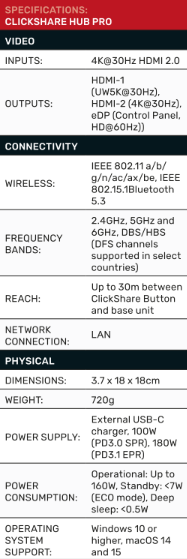
The Hub Pro compute unit carries that same design thinking through, and this is where things really start to shine. Rather than relying on an off-the-shelf OEM compute from Dell, Lenovo or similar, Barco has designed a dedicated ClickShare chassis. That decision enables a far more common-sense approach to connector placement, mounting and overall integration, and it’s resulted in one of the sleekest and most practical wall-mounting solutions currently available for a Teams Room compute.
The compute mounting bracket itself is small and discreet, with a footprint no larger than the compute unit. More importantly, it includes an integrated cable management system that genuinely sets a new benchmark for what mounting hardware in this category should look like. By comparison, many manufacturers are forced to engineer mounting solutions around bulky, heavy OEM computes, resulting in oversized metal plates and awkward cable runs that add unnecessary complexity on site.
Last, but by no means least, the signature buttons. ClickShare has set the benchmark for the dongle-based approach to content sharing for as long as it has existed. While many manufacturers have spent years trying to avoid the idea altogether, it feels like most have finally realised there are easy ways to do things and hard ways. A dedicated button turns out to be the easy one.
As you’d expect, the latest generation buttons are cleanly designed and feel properly robust. They now use USB-C, with a thick, flexible silicone cable that feels built for real-world abuse rather than careful once-off demonstrations. The button overall has a reassuring weight to it and doesn’t feel like a disposable accessory that you’re about to lose.
Unsurprisingly at this point, Barco hasn’t ignored storage or placement. The buttons ship with a thoughtfully designed mounting solution, a small envelope-style housing with an integrated kickstand that sits neatly on a tabletop without getting in the way, or can be wall-mounted if required.
It’s a small detail, but like much of the ClickShare ecosystem, it reflects an understanding that these products live in shared spaces, and need to survive them.
Set-up and start-up
I want to go on record here. This is, without question, the fastest Microsoft Teams Room setup I’ve ever done or watched anyone else do.
I’m deliberately excluding the Teams Room configuration itself, because that part can vary wildly depending on client-side realities like networking, support and overall readiness. What I’m talking about is the physical setup: Connecting the hardware and getting the system to the point where it’s ready for Teams Room sign-in.
In my living room, that took seven minutes. Two of those minutes were taken up by a required firmware update.
Onboarding is just as painless. Barco includes a QR code in the box, and a digital version appears on the touchscreen as soon as the system powers up. Scan it, enter your partner account details and you’re dropped straight into the XMS Cloud registration flow, which, crucially, is properly mobile-friendly.
That small detail matters more than it sounds. Network readiness on client sites can be unreliable at best and non-existent at worst. As long as you can get an internet connection to the device and a signal to your phone, you can push ahead with basic commissioning without waiting for everything else to be perfect. Confirm the device details, and you’re done.
From there, the system is fully onboarded and ready for proper management: Permissions, usage statistics, network diagnostics, fault reporting, all the things you actually care about once the room is live.
Content sharing: The real problem to solve
Now we get to the real reason we’re all here.
Highlighting that this isn’t a review of Microsoft Teams Rooms as a concept or of Teams Rooms functionality. That’s Microsoft’s domain, and they’ve covered it well enough already. What matters here is the one problem that has consistently tripped up Teams Rooms for the better part of a decade: Content sharing.
Sharing content has embarrassed even some of the proudest manufacturers in the AV industry. Promises have been made, roadmaps have been waved around, and for years, we’ve heard more vapourware than solutions. Even now, many of the most prominent names in the Microsoft Teams Room ecosystem still haven’t properly solved it. Sharing still works half the time, some of the time.
Barco, with ClickShare in contrast, have always treated content sharing as non-negotiable. It’s the foundation of their entire platform. So, when that DNA is applied to an MTR solution, expectations are high. After testing it, I can say this comfortably: If you’re offering a wireless sharing experience, whether that’s in-room or a live conference, and you’re not at this level, you are no longer competing.
Most alternatives are still a mess. Some require native apps. Some push users to a browser-based HTTP page. Others ask you to fall back on AirPlay, Miracast or Google Cast. And when all else fails, you’re handed an HDMI or USB-C cable and told to make it work.
Can anyone even say the words “Display-Link” anymore without recalling some well-earned PTSD? Nothing is universal, and the experience changes depending on whether you’re sharing locally or in a meeting.
ClickShare doesn’t do that.
With the fifth-generation ClickShare Button, USB-C, WiFi 6, completely driverless, sharing is now brutally simple. Pick up the button. Plug it in. Wait for the LED ring to turn solid white. Press the button. Your content is live. End-to-end, it’s about a ten-second process.
I tested it on macOS. I tested it on Windows. Flawless.
Where this genuinely caught me off guard, though, was mobile. I grabbed the button, plugged it into my iPhone, and assumed there was no chance this would work cleanly. The LED turned white. I pressed the button. My phone screen appeared on the display.
That’s the moment this solution changes the game.
Phones have always been the outlier. You never have the right cable. Adapters are missing. Wireless casting depends on network access, permissions, or whether protocols like AirPlay are even allowed. And while the Pro Hub does support all the major wireless casting standards, this bypasses all of that.
If there’s a network issue you can’t solve, and your phone has a USB-C port, you plug in the same button you’d use on a laptop, and you’re sharing. No apps. No adapters. No different workflow. No IT support. No quick reference guides.
And critically, nothing changes based on context. If you’re in a Teams call, you’re sharing in the call using the button. If you’re not, you’re sharing with the room using the same button. Same action. Same result.
So, final thoughts on the ClickShare Hub Pro and control panel kit.
Final thoughts
This feels like an arrival moment. For Barco, yes, but for the Microsoft Teams Room category as a whole. We’re finally at the place that manufacturers have been promising we’d reach for years and in many cases, failing to deliver on.
What I find most interesting here is that this is Barco’s first serious step into the MTR ecosystem. And yet, rather than easing their way in, they’ve arrived with something that feels fully formed. Purposeful. Confident. This is what the platform is supposed to look like when a manufacturer actually understands the problem it’s trying to solve.
I’ve spent long enough around this industry to enjoy watching incumbents get comfortable, delaying, iterating slowl and shipping products that deliver half the promise in twice the time. This is what happens when someone else stops waiting.
Barco’s history in collaboration and content sharing runs deep, but with their first real bite at the MTR cherry, they’ve set a bar that’s uncomfortably high for everyone else.
If Microsoft Teams Rooms are anywhere in your future plans, the ClickShare Hub Pro should be at the very top of your list.
Manufacturer: Barco
Distributed by: Audio Visual Distributors
-
ADVERTISEMENT
-
ADVERTISEMENT
-
ADVERTISEMENT
-
ADVERTISEMENT