
StormAudio ISR Fusion 20
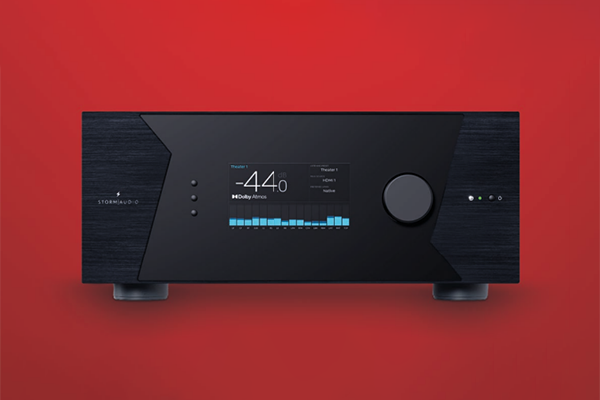
Is this the home theatre receiver we’ve all been waiting to get our hands on since Dolby Atmos was launched in 2012? Stephen Dawson checks it out to see how it stacks up.
Storm Audio is a French company (France seems to be killing it in the audio field lately!) specialising in home theatre electronics. The ISR Fusion 20 is what it calls an “Immersive Sound Receiver”. I’d call it a home theatre amplifier (there’s no radio tuner built in, which is what is conventionally required of a receiver in the English-speaking world).
ADVERTISEMENT
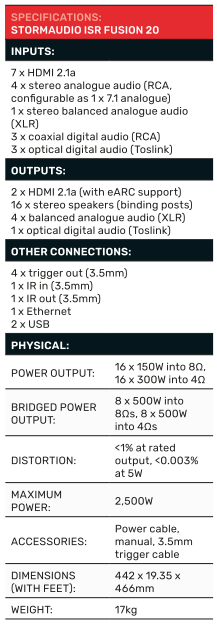
But, my, what a home theatre amplifier! It has 16 amplifier channels built in, and four additional (kind of) line-level outputs for a total of twenty channels. And each of those 16 amplifier channels is rated at 150W output into 8Ω and 300W output into 4Ω (at 1% THD – that falls to 0.003% at 5W).
Not enough? You can bridge pairs of channels for 500W output (into both impedances).
Those four additional outputs are implemented as balanced XLR, which would be ideal for running to subwoofers, given the rejection of electrical noise provided by balanced connections. You can make adaptors to change them to unbalanced. Note: Check your adaptors. The wiring outlined in the manual did not conform to the Jaycar-purchased adaptors I normally use.
There are seven HDMI inputs and two outputs. The outputs are configurable, so you can run one to a second zone. All are rated at HDMI 2.1a and HDCP 2.3. An on-screen display is available, although switched off by default. As we’ll see, this unit is not dependent upon an OSD for setup.
There are three coaxial digital audio inputs, three optical ones, four sets of RCA sockets for analogue stereo connections and a pair of balanced XLR inputs.
You’re not going to run short of inputs for just about any conceivable system.
The front panel display shows the volume and input quite prominently, and as we’ll see, some other technical information.
This is a large unit. It’s actually just a little wider than the norm for electronic components (442mm). Although it would squeeze into a place for such a component, you should resist the temptation. It has three cooling fans on one side, which draw air through from the other side, so it needs a decent amount of space around it.
Remember, this thing is rated for a peak power consumption of up to 2,500W. The amplifiers are ICE Power modules, which are highly efficient, but having so many must produce a fair bit of heat when working hard.
In use, I found the fan switching on for a few minutes when I switched it on, and again when I switched it off, and with my stereo-only use, not at all otherwise. They sound gentle and fairly quiet.
It comes with mounting racks.
And the unit is also specified as Roon-ready.
So, what is it about Dolby Atmos?
These days, Dolby Atmos is in large part a marketing term used for all manner of devices, including simple sound bars and TVs. But it still exists as a proper way to realise truly immersive sound in home and cinema. When it was introduced in 2012, the main focus was on the new discrete height channels and on the “objects”. Those objects were vectors of sound. Instead of recording the sound in each of the encoded channels, the object stood alone, with definitions of its movement through space and changes in characteristics over time. The decoder would work out how to render that by feeding elements to the various channels. Dolby Atmos supports up to 128 audio objects.
That broke Dolby out of the “hard-coding” of sound, and made soundtracks much more independent of the details of how the speaker layout was implemented. The Dolby Atmos decoder would take what it knew about the speakers and make the sounds come out at the right places.
And Atmos could handle up to 64 channels!
At the same time as Atmos was released, so was Dolby Surround. This folded in all the processing from the previous Dolby versions, allowing it to create additional channels from whatever was in the soundtrack to, again, use all the installed speakers appropriately.
But as the years went on, up until 2020, when I largely shifted my focus to stereo, the big electronics company home theatre receivers seemed stuck, even with their premium models. I think the best I ever saw was a 7.2.4 model. That is, left, centre, right, surround right, rear right, rear left, surround left, plus two subs and four ceiling speakers (or Atmos-enabled fronts and surrounds). Perhaps it was limited capacity in reasonably-priced DSPs, or perhaps a market judgement that few would be interested in going further. I occasionally saw a press release for high-end surround processors from high-end companies that offered more, but the one time I got my hands on one, I couldn’t actually use it. All the outputs were XLRs, and the company sniffily implied I was unworthy to test it since I didn’t have a good collection of power amplifiers with balanced inputs. Oh well.
That’s why I am thrilled to see the StormAudio ISR Fusion 20. It offers the flexibility to provide a good chunk of what Dolby Atmos (and its various competitors) have to offer.
Setting up the StormAudio ISR Fusion 20
This product is squarely aimed at the installer market, so it doesn’t have all the consumer-friendly stuff you’ll see in your Denons and Yamahas and such. That said, the unit comes with a simple 2.1 default setting out of the box, so you can plug in a couple of speakers and a subwoofer and get going straight away.
The wealth of configuration options is astonishing. To make those settings via a menu system displayed on your TV would be daunting indeed. Happily, everything is done by a web interface. The quick start guide tells you how to find the IP address that the unit is allocated once it is plugged in. You type that into your web browser, enter the secret password (“installer” – don’t worry, you can change it), and you’ll find yourself in a well-designed interface for adjusting everything.
There is a “StormEasy” option, which operates as a setup wizard, at the cost of eliminating a lot of options. But you can then go into the “Expert” section and change everything.
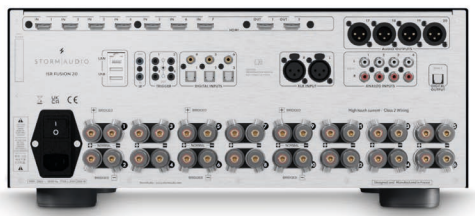
For example, the speaker terminals aren’t labelled conventionally, just numbered (although one and two are left and right front by default). I found it most convenient to wire my stereo speakers to three and one (for left and right) before switching on the unit. In both the easy and expert sections, I could allocate the outputs appropriately. You can make any channel feed any loudspeaker.
You can even make several channels feed one speaker. Let’s say you have a couple of three-way speakers that you would prefer to operate with an active crossover and multiple amplifiers. You can set up three amplifier channels to drive each of them with appropriate levels and crossovers. Up to four-way speakers are supported.
Up to six independent subwoofer channels are supported. You could, for example, run four active ones from the XLR outputs and a couple of passive ones from the built-in amplifiers. Or if you have a couple of super high-end monoblock power amplifiers, you could run them from a couple of the XLRs to power your front stereo speakers.
Let’s just say that with this unit, you have options.
Those options include setting up multiple “Theatre” selections. You can have a pure stereo one, for example, and a 5.1 channel one and even more, with different treatment for up and down conversion. And then pick whichever one you want from a dropdown list. And, of course, you can name everything whatever you want.
There are also six trigger outputs which can be individually allocated to various functions, so the unit can switch on and off the external equipment required at any particular time.
Installers will use the Dirac Live calibration system. This performs the functions, and more, or things like Audyssey: room and speaker EQ, time alignment, and impulse response correction (which corrects for smearing from room reflections).
Unlike such things as Audyssey, the unit doesn’t come with a microphone, nor even a socket into which you plug a microphone. Installers will typically have the Dirac Live software on their installation laptop along with the recommended USB microphone. Via the network, the software makes the ISR Fusion 20 produce a bunch of test tones, the software does the calculations, and then the results are loaded into the unit’s DSP.
I have used Dirac in the past, and it works extremely well. The impulse response correction seems to be particularly well regarded. Some home theatre gear that implements Dirac only provides a subset of its features, requiring an additional purchase to unlock its full power. The ISR Fusion 20 includes a licence for the whole thing.
Damn, I almost forgot to mention, but for completeness, I should say that you can also set up all manner of zones of considerable complexity.
Using the StormAudio ISR Fusion 20
I’ve probably undersold consumer friendliness with this unit. It’s fine for anyone to use once an installer has worked through the settings. Especially since the remote control is nicely simple, and there’s a simplified “Storm Remote” app which allows volume control, input, “Upmix” and Theatre preset selection.
Now, to be clear, I am now a stereo guy. I don’t have a subwoofer any more, nor any surround speakers. So, I set up the unit with a selection of inputs and only two loudspeakers – quite expensive Dynaudio Contour 20i stand-mount speakers.
There’d be little point in paying a lot of money for an amplifier that doesn’t get the sound-quality basics right. Well, it certainly did that with no problems. When a user switches to native stereo mode and starts streaming some high-quality music, they will be satisfied.
As for Dolby Atmos, DTS:X Pro, EMAX Enhanced, Auro3D and such, I have no doubt that this unit will do all of these as well as they can be done.
Video handling was more than my system required: It happily dealt with high-frame-rate Ultra HD Blu-ray, and everything a PlayStation 5 could throw at it.
And for those consumers who like to know what’s going on, the front panel display shows, in smaller print, the audio and video signal standards, including current resolution and colour mode. The unit is rated at up to 8K120 at 4:2:2, 10-bit. Storm Audio promises firmware upgrades if a new standard emerges.
The OSD is basic text, but informative when required. Most people probably won’t want it, but having the same nerdy information available on the large screen appeals to the likes of me.
There was one slightly amusing quirk: my LG OLED TV reported that it was connected to a “Samsung soundbar”. Seeing as how I haven’t used one of those for many years, and certainly not with the current TV, I’d guess that the ISR Fusion 20 shares some HDMI components with Samsung, or perhaps has some leftover Samsung data in its HDMI handshaking data.
Conclusion
Obviously, the Storm Audio ISR Fusion 20 isn’t for everyone. It is for high-end home theatre installations. It’s hard to see how it could be improved.
Manufacturer: StormAudio
Distributed by: Audio Active Australia
-
ADVERTISEMENT
-
ADVERTISEMENT
-
ADVERTISEMENT
-
ADVERTISEMENT